

Locating and floating bearings on a fan shaft: letting the shaft grow
One bearing fixes the shaft position, the other must be free to slide. Why a stuck floating bearing makes fans run hot, and how to put it right.
The principle
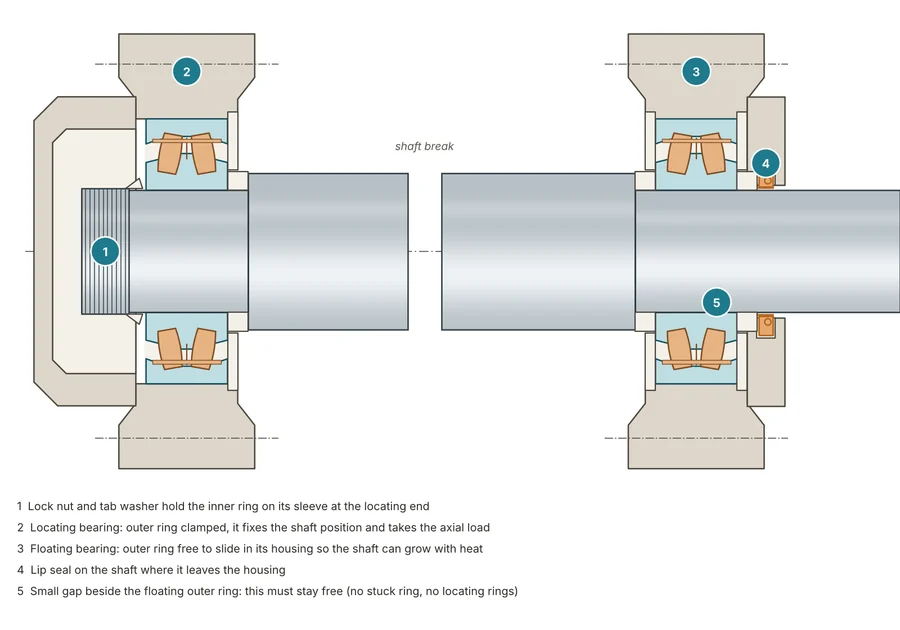
A fan shaft carried on two bearings needs one fixed (locating) bearing, or bearing pair, that sets the shaft position radially and axially, and one non-locating (floating) bearing that holds the shaft radially but lets it grow or shrink with temperature. If the floating bearing cannot move, thermal growth, and any axial force from the impeller, load both bearings axially and heat builds quickly.
Check the floating function
On fans that run hot, verify that the non-locating bearing can really move:
What to check
- Remove any locating or retaining rings on the non-locating bearing side.
- Look for a worn housing seat: wear can pinch the outer ring so it sticks and the bearing loses its floating function.
- Check for fretting corrosion on the outside of the outer ring. Brown dust and polished bands say the ring is moving or being loaded unevenly.
- Check that the bearing is not preloaded by an over-tight cover, by shims or by the housing being pinched on an uneven base.
Options if the problem keeps coming back
- Use a bearing that floats inside itself: a cylindrical roller bearing with one rib free, or a toroidal roller bearing, so locating rings or housings can be fitted the same way at both ends.
- Use a housing and bearing combination with a tighter seating fit (for example K7) for spherical roller and toroidal bearings where unbalance would otherwise wear a soft seat.
- Do not cool the housing with a blower: the housing shrinks and can trap the outer ring (see the overview article).
Why the lock nut and sleeve matter
At the locating end the inner ring sits on a tapered sleeve or tapered seat, locked with a nut and tab washer. If the drive-up is too low or too high the inner ring can creep on the sleeve or the bearing becomes preloaded. See the fits article for how to set it.