

Fan bearing hot from load: too much, too little, misaligned or pulled by the belt
Axial and radial overload, a minimum-load problem that makes rollers skid, angular misalignment and belt tension: how each looks in the bearing.
Too much load, radial or axial
Unbalance on the impeller makes high radial forces that rotate once per shaft turn. Left alone they can make the outer ring turn in the housing, wear the housing seat and, as the seat wears, allow the floating bearing to stick, which puts axial load on the whole system. The raceway under that overload shows damage while the other side stays like new.
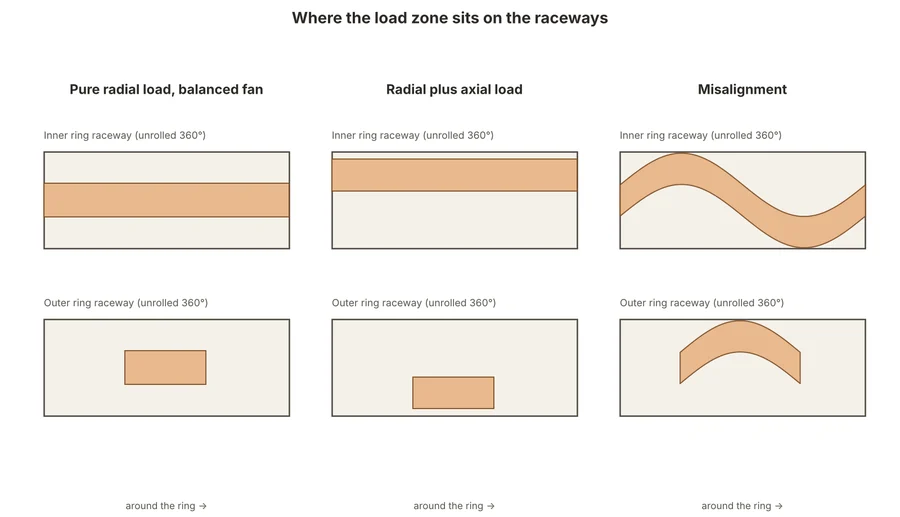
Reading the load zones
- In a balanced fan with pure radial load the inner ring has a full 360° load zone and the outer ring a zone of about 120°, both centred in the raceway.
- With high axial load both zones move to opposite sides of the raceway grooves; the inner ring zone is still 360°.
- Misalignment makes the band wander across the raceway width: it is wide and offset at one position on the outer ring and runs side to side on the inner ring.
- It is often not possible to see these patterns without dismounting the bearing. The housing seat (worn bore, a pattern of the bearing's lubrication grooves imprinted in it) and fretting corrosion on the outside of the outer ring tell you earlier.
Too little load: rollers sliding instead of rolling
Every rolling bearing needs a minimum load. Below it the rolling elements slide on the raceways instead of rolling, causing smearing (adhesive wear) at the start of the loaded zone. It happens on lightly loaded fans, with belts that are too slack, or with lubricants that are too thick for the speed. Check what the bearing sees at the lowest running speed and consider a different bearing type, a thinner lubricant or a preload.
Angular misalignment of shaft or housing
Vibration monitoring shows it as a high amplitude at twice the outer ring defect frequency. Check the seals first: a contact seal should touch the shaft evenly all round with no gap or flattened lip, and the gap of a non-contact seal should be uniform. Check the straightness of the fan support structure and the shaft, soft foot, belt tension, and then align the shaft, housing and adjacent parts. Where misalignment cannot be avoided a self-aligning bearing solution is the better choice.
Belt tension
Too tight a belt makes bearing loads far higher than the bearing was selected for and reduces the lubricant film. Too slack a belt means the bearing misses its minimum load and the rollers skid. Set tension with a meter, not by feel (see the belt drive article).